Products & Services · · Team LATENT
DeepSeek’s new model demonstrates game development in Godot
Starting from DeepSeek’s Godot demo, we follow a one-room game through Godot, Unity 6 and UE 5.8: requirements, scene edits, compilation, input and logs, diagnosis and saving, with concrete roles for agents and developers.
On October 17, DeepSeek accompanied its V4.1-Flash-1017 update with a Portal 2-style demonstration made in Godot. The footage depicts carrying a cube through a portal, across a bridge and toward an exit: several connected actions within an existing game engine. DeepSeek announcement
What work would producing a game with an agent involve? After examining the published demo, we use a shared example—a room where placing a cube on a floor switch opens the exit—to explore Godot, Unity 6 and UE 5.8. These are editorial workflows assembled from public specifications and not executed here; they are not DeepSeek’s production trace.
Key takeaways
- DeepSeek’s Godot footage depicts object handling, portal traversal and movement toward an exit. It is a developer demonstration; the inspected announcement does not include exact prompts or the complete project.
- Delegating development requires explicit state transitions and checks, inspection of existing scenes and code, and iteration between edits and verification. Godot files and CLI, Unity Pipeline and Unreal toolsets expose different operations and results.
- Compilation, passing tests and intended gameplay are separate checks. Saving and Undo have implementation-specific scopes; handoff still needs change records, repeatable verification and human evaluation of play.
What DeepSeek demonstrated in Godot
The Godot example opens in a test chamber enclosed by white panels and metal structures. The screen shows “TEST CHAMBER 11” and a gun-like device on the right. A cube is held in front of the viewpoint, accompanied by a prompt to drop it. The engine attribution comes from DeepSeek’s caption; the behavior described here was observed in the published animation.
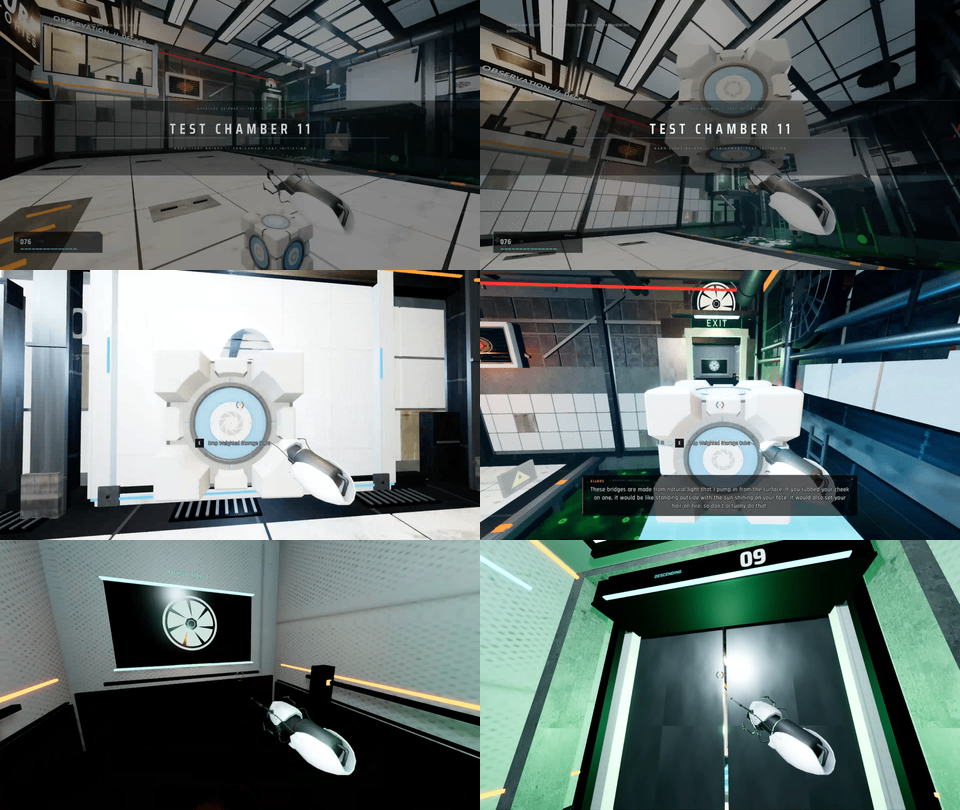
While holding the cube, the viewpoint approaches a blue-rimmed oval on a white wall. The opening shows the chamber from another angle. That view expands on approach, and the viewpoint emerges on an elevated platform with the cube still in front. The sequence depicts passage through a portal to another position.
The view then crosses a blue luminous bridge toward a doorway marked EXIT. Near the entrance, the cube moves downward and the prompt changes to picking it up. The viewpoint enters a lift-like enclosure and turns back; the doors close and the display changes from 11 to 10 to 09. Object handling and movement through the space form a connected sequence.
The route toward the exit shown in the Godot demo
Carry the cube
The cube stays in front of the view, with a drop prompt.
Traverse the portal
Pass through the blue-rimmed opening to an elevated platform.
Cross the bridge to the exit
Approach EXIT; the doors of a lift-like enclosure close at the end.
This does not establish a recreation of the whole of Portal 2. The clip does not show placing a portal or trying different inputs. What it presents is a game scene that connects several actions in a chamber reminiscent of Portal 2.
DeepSeek says the examples were made within Harness using limited prompts, references and conversational turns. The inspected announcement does not supply the Godot example’s full prompts, project or tool trace. Observing the footage is distinct from reproducing its creation under the same conditions. Stated production setup
The 1017 update and how to access it
The 1017 release updates the existing DeepSeek-V4.1-Flash. DeepSeek says reinforcement learning with self-feedback improved its ability to develop complete projects. The Godot example is one of the demonstrations presented alongside that claim. October 17 update
Vision was already supported on September 10. Image reading in Minimal mode, added in the October 17 Harness rc.1 release, is a working-environment update distinct from the model update. Earlier DeepSeek updates / Harness release notes
The web and app models have also been updated; API users can select deepseek-flash. Invocation and pricing remain unchanged, and DeepSeek recommends Harness 0.2.1-rc.1 or later. Access and recommended version
Define the requirements for a one-room game
Keep the example small: one room, a player, a carryable cube, a floor switch and an exit door. The door opens only while the cube is inside the switch area and not held. Carrying it through the area does not open the door; picking it up within the area closes it. Reset returns the cube and player to their starting positions and closes the door. This shared specification lets us compare the work across engines. It does not include portal implementation.
The initial request should describe state changes as well as appearance. “Create a door” leaves its initial state and opening condition unspecified. Say that it starts closed, only the target cube activates the switch, lifting the cube releases it, and the sequence remains repeatable after reset. Existing placeholder assets can supply the room while the interaction is developed.
Acceptance includes release and repetition: closed for the player alone, closed for a held cube in the area, open after release, closed when picked up in place, and restored by reset. A picture of an open door establishes neither release nor reset. If the player alone activates the switch, that also violates this example’s specification. Preparing counterexamples helps distinguish a convincing screen from the requested behavior.
Next define the workspace. Even a new room may live in a project with established input settings, units, assets and naming conventions. Creating controls from a project name alone can conflict with an existing player controller. Identify the scene, permitted assets and editable files or objects, and retrieve their current state before changing them.
Separate the model, Harness and engine. The model selects an action from the request and observed state; an execution environment such as Harness edits files or invokes tools; the engine loads and runs the project. MCP is one connection mechanism, not the model or a game-generation feature. Direct CLI execution through a shell provides another route. Harness workspace
A shared loop for building and checking the room
Requirements and current state
Define the intended behavior; inspect the scene, code and configuration.
A small change and completion check
Change one relationship and wait for loading or compilation results.
Inputs and observed results
Exercise placement, pickup and reset; compare state, images and logs.
If behavior differs, gather evidence for that symptom and revise. If it matches, check saving and the diff before proceeding.
Keep changes small enough to connect them to the symptom. Rewriting input, cube physics, switch detection and door motion together obscures which change helped. Instead, check whether input arrived, whether the switch recognized the cube and whether it passed state to the door. Return the target, action, expected state and actual value or error to the model together.
Build a Godot game through project files
Align the execution environment and project entry point
First ensure that Harness can access both the project files and the Godot executable. Configure the model, API key and workspace, and record the installed Godot version. Naming a folder in chat does not grant file or process access; a cloud executor also needs a route to the project and engine. This example uses Godot 4.x APIs, without identifying the version used in DeepSeek’s demo. Harness setup
Read project.godot, the relevant .tscn scene, .gd scripts and assets. Identify the entry scene, input bindings, parent-child relationships and script references. TSCN represents nodes, properties, resource references and connections as text, allowing file-based inspection. Renaming a node without updating its references can still break loading or execution. Project files / TSCN structure
Build the room structure and gameplay rules separately
One layout places Player, Cube, Plate and Door beneath a room node. CharacterBody3D can serve scripted player movement, RigidBody3D a simulated cube, and Area3D the switch region, each with suitable visuals and collision shapes. These are design choices, not mandatory architecture. Separating appearance, physics and detection helps locate a fault. Player body / Cube body
Pickup needs its own conditions. A RayCast3D in front of the camera can identify a reachable target; accept the action only for the intended cube within the chosen range. Define the collision mask and self-exclusion, and align named actions such as interact and reset with the code. An on-screen prompt does not establish that the input binding and detected target agree. RayCast detection / Input actions
Carrying is not merely moving a mesh each frame. Repeatedly changing an actively simulated RigidBody3D’s Transform can produce unintended behavior. Design its physics state during pickup, release and reset together. Whichever carrying method is chosen, this example needs one authoritative held state that all three operations update. Controlling RigidBody3D
Configure the Plate’s Area3D monitoring, shape, layer and mask. Entry and exit events maintain candidate bodies; the rule checks whether the intended Cube is among them and unheld. A custom signal can send held-state changes to the same reevaluation function. The Door consumes the result. This separates eligibility from the door’s visual implementation. Area3D detection / Signals
Check loading before checking play
After editing, separate resource import, script parsing and game execution. --import waits for importing and exits; --check-only with --script parses the supplied script. Neither exercises the five acceptance cases. Then run the selected scene and record the project, scene, output and exit state. Godot command-line operations
Harness’s shell returns stdout, stderr and exit information. With background-job support configured, a long operation yields a job ID for later output retrieval. A launch response is not completion evidence: inspect the command and relevant logs. Its implementation starts a fresh shell for each call, so specify the working directory instead of relying on a previous directory change. Harness execution results and jobs
Automated checks require a game-specific test scene or script. Arrange held and released states, wait for the relevant physics update, and inspect Plate and Door, reporting mismatches. Area3D overlap information updates during physics processing, not immediately after every Transform edit. Such a test checks the rule; the path from actual input to pickup needs separate coverage. Frame and execution management / Overlap update timing
Connect Godot file edits to gameplay evidence
Read and edit
Align project settings, scenes, scripts and resource references.
Load and execute
Import and parse, then run the intended scene and inspect results.
Compare input, state and images
Check the five cases against logs and rendered output; revise the failed relationship.
Return the failed condition and evidence to editing. Recheck the case and reset, then review the change and play experience.
Visual inspection needs rendering. Headless mode disables rendering and window management, so a clean headless run cannot establish camera framing or control prompts. One capture route saves the Viewport after rendering, then passes that file to Harness’s read_image. Image reading itself neither captures the screen nor supplies gameplay input. Headless scope / Capturing rendered output / Harness image input
Diagnose release on the switch without an opening door
Suppose release within the Plate does not open the door, but moving the cube out and placing it back does. Record the detected body, held changes and the state sent to Door during one trial. If overlap already exists and held changes from true to false without a door update, the rule may be evaluated only on body_entered.
A candidate repair sends a held-state notification from the carrying code and invokes the same eligibility calculation used for entry and exit. Check its recipient, connection and state owner before rebuilding Plate. Retest release in place, then held overlap and pickup in place. Reset must restore holding and eligibility state as well as positions.
If the door looks open but blocks passage, inspect collision separately from eligibility. Exercise traversal and compare visual and collision positions. Preserve scene, code and configuration changes, and confirm the next run starts consistently. Reloading a scene for reset does not necessarily clear autoload state. A person should then assess interaction reach, instructions and recovery from mistakes. Scene reload / Runtime inspection
Inspect and change a Unity 6 scene
Select the connection and inspect the existing room
Unity’s official route installs Pipeline in a Unity 6.0 LTS-or-later project and connects Unity CLI to the running Editor. For MCP, the client launches unity mcp over stdio; the CLI server forwards operations to local Pipeline. Direct shell commands provide another route. This example uses the documentation for experimental Pipeline 0.8.0-exp.1. Official MCP architecture / Pipeline setup
Wait for installation-related compilation and confirm the intended project, specifying its path if several Editors are open. Use list_open_scenes to inspect loaded scenes and dirty state, then get_scene_hierarchy to locate the room, player, cube and door. Preserve pre-existing unsaved work as part of the baseline. Decide whether to reuse a door before creating another object with the same name. Scene and hierarchy inspection
The hierarchy does not explain behavior. Read component properties, the switch’s door reference, the cube’s Collider and Rigidbody, and existing input code. Locate assets and C# through find_assets and read_text_file. Identify the relationship between the component that owns held state and the reference used to control the door. Component operations / Assets and source text
Complete scene components and C# in the right order
Create and position the floor, walls, cube, switch and door, then add their components. Pipeline exposes GameObject creation, Transform edits and component operations. Inspect the affected target in each result. The rule accepting only an unheld cube is project code; it does not follow automatically from the room’s geometry. GameObject and component commands / Authoring results and references
Connect the components deliberately: the switch’s trigger Collider gathers candidates, the carrying component updates Cube’s held state, and Plate sends its eligibility result to the referenced Door. Check the required Collider/Rigidbody combination and distinguish the visible floor from the detection volume. Pickup and release must notify Plate as well as change held, so state-only changes reach the same door rule. Physics notification prerequisites
A newly written C# component cannot be attached immediately. The documented sequence is create_script, recompile, recompile_status, then attach_script. Compile an illustrative PressurePlate class before attaching it and assigning its door reference. PressurePlate is a name for this example, not a built-in Pipeline gameplay feature. Creating and attaching scripts
Do not proceed on a compilation-start acknowledgement. Inspect recompile_status alongside failed, errors and compilationFailed. If domain reload interrupts the connection, reconnect and inspect the type and object before repeating a creation operation. The original operation may already have changed the project. Compilation results / Reconnection and operation state
In Unity, connect compiled types to scene references
Read current Editor values
Compare the hierarchy, components and C# to identify the target.
Create and await compilation
Create C# → inspect recompile_status → attach_script → read references back.
Check Play and tests
Use actual input, console, PNGs and test_status for their respective checks.
Return the failed condition and evidence to editing. Recheck the case and reset, then review the change and play experience.
Move from starting Play to exercising inputs
Read back the serialized door and cube references, save the starting state in Edit Mode, then use editor_play. Entering Play does not walk the player or pick up the cube. Confirm editor_status, inspect console, and deliver the PNG path returned by screenshot to an image-reading tool when visual inspection is needed. Play and capture / Logs
Inputs can be exercised by a person or by project tests using the Input System. InputTestFixture supports simulated devices, but meaningful tests still have to be written. Pipeline’s input simulation is a separate route requiring the Input System and runtime configuration. An ordinary Editor connection does not automatically exercise arbitrary gameplay. Input testing / Runtime connection requirements
Separate tests of switch logic from tests exercising pickup input through to the door. Select relevant tests with run_tests; for asynchronous execution, retrieve completion and results with test_status. An accepted start or zero selected tests is not a pass. Report which of the five conditions each test covered and where it failed. Test selection and asynchronous results
Diagnose a door that stays open after pickup
Consider a door that opens on placement but stays open when the cube is picked up in place. Log overlapping targets, held state and door state for the same trial. If overlap persists while held state changes, inspect whether door updates depend only on entry and exit events. OnTriggerEnter reports a physics interaction, not the gameplay meaning of holding an object. Trigger notification conditions
A candidate repair is to track overlapping candidates separately from held state and reevaluate the door condition when either changes. Correct a miswired notification reference if that is the evidence; trace the recipient if a correct condition never reaches the door. Recompile and rerun all five cases. A silent console does not establish correct deactivation behavior.
Stop Play, preserve permanent changes in Edit Mode, then inspect dirty state and file diffs after saving. save_scene and save_all are unavailable during Play; Prefab changes involve separate persistence. Unity Undo covers registered edits, not all C# writes or asset creation. A person should review the affected files and scene, then play to judge the clarity of the interaction. Saving conditions / Undo scope
Connect actors and gameplay state in UE 5.8
Distinguish exposed tools from additional integration
In UE 5.8, enable experimental Unreal MCP and the required toolsets, restart, then start the server. An external client connects over local HTTP and uses list_toolsets and describe_toolset to discover actual operations and schemas. Choose actor-editing tools separately from the means of authoring gameplay rules. Connecting MCP does not expose a complete cube-game generator. Unreal MCP setup and discovery
Editor APIs can inspect Blueprint structure, but they are not all verified stock MCP tools. Use operations exposed by the installed version, or select a scoped custom tool, Editor script or human edit where needed. API names such as BlueprintEditorLibrary below describe capabilities for that integration layer. Python automates authoring; runtime pickup and door behavior remain Blueprint or C++ artifacts. Editor Python’s role
Read actor placement and Blueprint relationships
Identify the map, pre-existing edits and the floor, Cube, Plate and Door actors. A custom inspection tool can use EditorActorSubsystem to enumerate loaded Editor actors and resolve paths. That enumeration excludes PIE actors. Keep edit-world and running-world state distinct rather than assuming identically named objects expose the same values. Editor actor reference scope
For a Blueprint design, map the Cube’s held variable, Plate’s candidates, Door reference and reset behavior first. BlueprintEditorLibrary exposes graph names, member variables and event implementations for inspecting existing logic. An empty Blueprint is not a completed rule: check which events update candidates, which held changes trigger reevaluation and which Door receives the result. Blueprint structure APIs
The proposed relationship is explicit: Plate’s overlap component adds and removes candidate actors; Cube’s carrying logic notifies held-state changes; Plate reevaluates and calls Door. Check that the notifying Cube and candidate are the same instance and that the reference resolves to the intended Door. Reset restores holding and candidate state as well as actor positions. These are game-design rules, not behavior supplied by connecting MCP.
A graph-editing integration should return more than a prose completion message. BlueprintGraphPin exposes types, links and compatibility checks, while connection and value-setting operations can fail. Read back the relevant types and execution path—for example, whether the expected Door reference and branch actually reach the update. These APIs do not establish complete stock-MCP graph generation. Pin types and connection results
Distinguish the compilation target. BlueprintEditorLibrary’s compile_blueprint returns true for compilation without errors; a custom wrapper should return that boolean, adding diagnostics only if collected separately. For C++ changes, official CompileLiveCoding requires enabled Live Coding, waits for completion and returns status, errors and warnings. Both compile something, but they validate different artifacts. Blueprint compilation / Live Coding results
In Unreal, distinguish editable and running objects
Inspect actors and rules
Discover actual tools; add scoped Editor API integration where required.
Edit and compile artifacts
Change Blueprint graphs/references or C++, then inspect the corresponding result.
Test conditions in PIE
Compare runtime state, Functional Test results and images.
Return the failed condition and evidence to editing. Recheck the case and reset, then review the change and play experience.
Distinguish PIE startup from passing gameplay checks
Inspect state after requesting Play. In a custom integration, LevelEditorSubsystem’s editor_request_begin_play returns None, not a test result; is_in_play_in_editor separately reports PIE state. Then exercise human inputs or test logic and observe the running Cube, Plate and Door. Reading Editor placement again does not perform that check. Play requests and state
A Functional Test in the level can repeat the five cases. Start after setup is ready, compare expected and actual state, and finish explicitly with FinishTest. Clean up spawned actors and altered state afterward. Otherwise a door left open by the previous test can conceal a failure. Test execution support does not supply the game’s assertions. Functional Test lifecycle
Use the installed MCP test operations where suitable, or run Automation through its separate CLI route. -ReportExportPath saves JSON and related HTML. A custom tool using that route should distinguish process start, completion, selected tests and report location, returning failures and logs rather than only “ran tests.” Automation execution and reports
Visual evidence also involves completion. A custom high-resolution capture integration should wait for its returned task and deliver the saved image. Some comparison APIs return true when a comparison is queued, not when it passes. Game-viewport capture and UI capture differ, so choose the appropriate scope when checking control prompts. Capture and comparison APIs / Capture task completion
Trace held-state changes through to the door
Consider a held Cube incorrectly opening the door on entering Plate. Log PIE overlap identities and held state, checking for the player or unrelated actors. If the candidate is correct, the Blueprint branch may test overlap alone and omit the held condition. A reference pointing to another instance can also make a familiar variable name misleading.
Use the evidence to correct candidate filtering, the held reference or reevaluation dispatch. Fixing held overlap alone can create a release failure if releasing never triggers another evaluation. Check that held changes and Begin/EndOverlap reach the same rule. After compilation, rerun the five cases and inspect traversable collision as well as door appearance.
For persistence, inspect dirty map and content packages separately. EditorLoadingAndSavingUtils can enumerate both and save an explicit package list. Do not fold unrelated pre-existing dirty assets into the task. UE 5.8.1 stopped grouping Assistant script-execution changes into one transaction, so one MCP request cannot be promised one-step Undo. Review packages, graphs and references, then save a recoverable version. Dirty packages and saving / 5.8.1 transaction changes
Choose between official and external MCP tools
The October 17 news is DeepSeek’s model update and demonstration, not a simultaneous launch of the compared engine bridges. This comparison uses documentation and pinned implementations checked on October 18, 2026, including Unity CLI 1.0.0-beta.13 from October 7 and external MCP for Unity v10.3.0 from October 4. Unity CLI releases / External bridge release
MCP support does not make these workflows interchangeable. A connection to a live Editor sees different state from a separate process modifying saved files. Compare ownership, supported versions and returned evidence, rather than choosing solely because a familiar tool name appears.
| Connection and provider | Target and prerequisites | Result boundary |
|---|---|---|
| Godot CLI + Harness | Shell access to the Godot binary and workspace; model setup is separate. | Command output and exit state; capture and input require their own mechanisms. |
| Coding-Solo godot-mcp | Community project, inspected at commit 1209744. Requires Node.js 18+, npm, Godot and an MCP client. | Edits saved scenes through another Godot process, not the open Editor’s unsaved state. |
| Official Unity CLI / Pipeline | Unity 6.0 LTS or later; install CLI and Pipeline and select the Editor. | Compilation, Play and tests are separate; test_status retrieves asynchronous test results. |
| MCP for Unity / maintained by Aura | External v10.3.0; Unity 2021.3 LTS–6.x, Python 3.10+, uv and the Editor package. | Own tools and resources; follow a test job_id with get_test_job. |
| Official Epic Unreal MCP | Experimental in UE 5.8; enable the plugin and required toolsets, then start it. | Use exposed tool schemas; distinguish additional Editor API integration. |
Coding-Solo’s Godot bridge uses a separate headless process for create_scene and add_node, saving scene files; specify a 3D root for this room. run_project acknowledges startup, while get_debug_output reads output from the tracked running process. The inspected commit exposes no capture, keyboard input or live Editor hierarchy tool, so those need other mechanisms. Inspected implementation / Scene operations
The implementation clears its tracked process after natural exit, so later retrieval may lose the in-memory output. A durable log helps short automated checks. Configuring a stdio server in Harness is also distinct from connecting successfully: inspect discovered tools and the selected Godot binary. This combination was not executed here. Process and log lifetime / Harness MCP connection
Even a tool named run_tests behaves differently across Unity bridges. Aura-maintained v10.3.0 returns a job ID; get_test_job retrieves progress and terminal results. A bounded wait returning progress is not completion. Enable its testing group and provide project tests; official Pipeline’s test_status is not interchangeable. External asynchronous tests / Job states and results
Costs and authority are separate checks. Unity CLI is free and the external Godot and Unity bridges listed here are MIT-licensed, but model, engine and asset terms remain distinct. Hiding tools, obtaining human approval and restricting filesystem writes are different mechanisms. Unreal’s registry can restrict exposed tools; that is not a universal restriction on arbitrary scripts. Unity terms / Unreal exposure settings
From a working scene to a game that can be revised
Across the engines, the deliverable includes more than a running image: changed scenes, assets and code, the initial state and results for the five cases. Record what changed and which execution checked which behavior, beyond an agent’s completion message. That supports handoff to another person or session. These workflows explain the work; they are not a claim that this room was implemented and passed here.
Passing the five cases still leaves questions for a player: pickup reach, visible held state, understandable door behavior and recovery through reset. A delayed response to placement may satisfy the rule yet confuse the player. Delegate checks supported by state and logs, while evaluating feel and clarity through actual play.
This connects to how an ongoing agent carries work and evidence forward, discussed in our agent comparison. For a game, the useful record goes beyond a finished image to the conditions that open the door and the checks a later change must repeat.
DeepSeek’s Godot demo depicts carrying an object through a portal toward an exit. Continuing such development requires more than code generation: project inspection, executable editing tools and evidence that guides repairs. Godot, Unity 6 and UE 5.8 provide different entry points. Examining the results available at each stage makes the division between delegated work and human judgment concrete.